Network tab
The Network tab on the server page holds the server's IP addresses, subnets and, on dedicated servers, network interfaces.
IP addresses
Set reverse DNS (PTR) for an address in its Reverse DNS field. A routed extra IP has the netmask 255.255.255.255 and no gateway: it is routed to your primary IP and must be configured on the server as a /32.
Ordering an extra IPv4
+ IPv4 orders one extra IP at a time. Sub-client users cannot order or move IPs.
- Layer 2 IP (/32) - 20 NOK/mo: an address from the same prefix as your primary IP. Works without extra configuration, for example for a virtual machine on the server. It cannot be moved to another server.
- Failover Routed IP (/32) - 30 NOK/mo: an address routed to your primary IP. Needs configuration on the server, but can later be moved to another server. Only available in region NOR; elsewhere the order is refused with
Failover IPs not available in this region. Contact support.
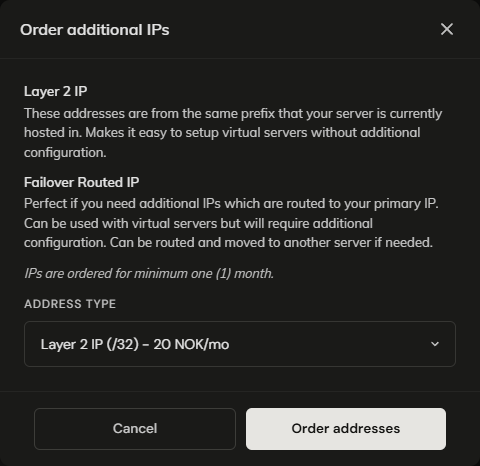
IPs are ordered for a minimum of one month and added as a line on the server's order (hourly servers pay for it per hour). On monthly and annual servers, if more than 34 days remain until the next billing date, a separate one-time invoice covers the IP up to that date.

The limit is 5 extra IPs per server; a further order is refused with Max number of additional IPs reached. Contact support. The dialog's note about 10 IPs on dedicated servers no longer applies. If you need more, or want an extra IP removed, open a support ticket.
Moving a routed IP
Move IP moves a routed extra IP to another of your servers. The billing line moves to the target server's order, recomputed for its billing model. The target must be in the same region as the IP, have a primary IP, and have fewer than 5 extra IPs.
Change network is only on servers with an IPv4 in an older address range. It moves the server's switch port to the network of the chosen IP, so that IP becomes the primary.
Subnets
The two Nameserver fields on a prefix delegate its reverse DNS, and are saved as you type. They must be hostnames, not IP addresses; anything else is refused with Submitted data is not a valid hostname or NS.

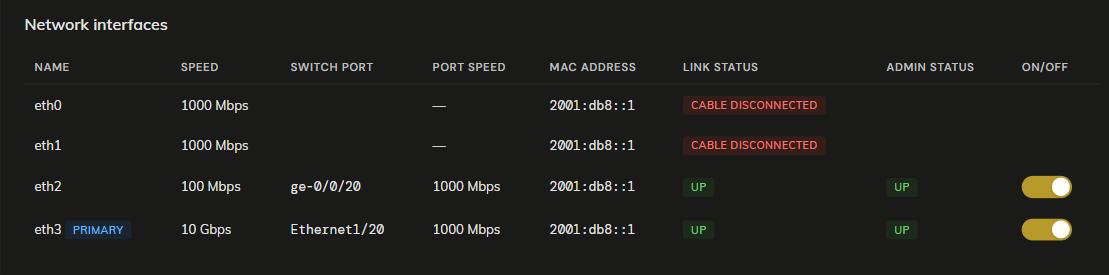
Network interfaces (dedicated only)
Switch port is blank when the cable is unplugged on our side.
The On/off toggle takes the switch port up or down, without any change in the operating system. It is only on interfaces with a live link, and only works on supported switch models; on others it fails with Operation not supported. Please contact support. It is refused while the server is suspended.