

ISO Images (KVM)
Boot a KVM server from your own ISO, for an OS or recovery tool that is not in the install list. Available on KVM servers; dedicated servers use the IPMI console.
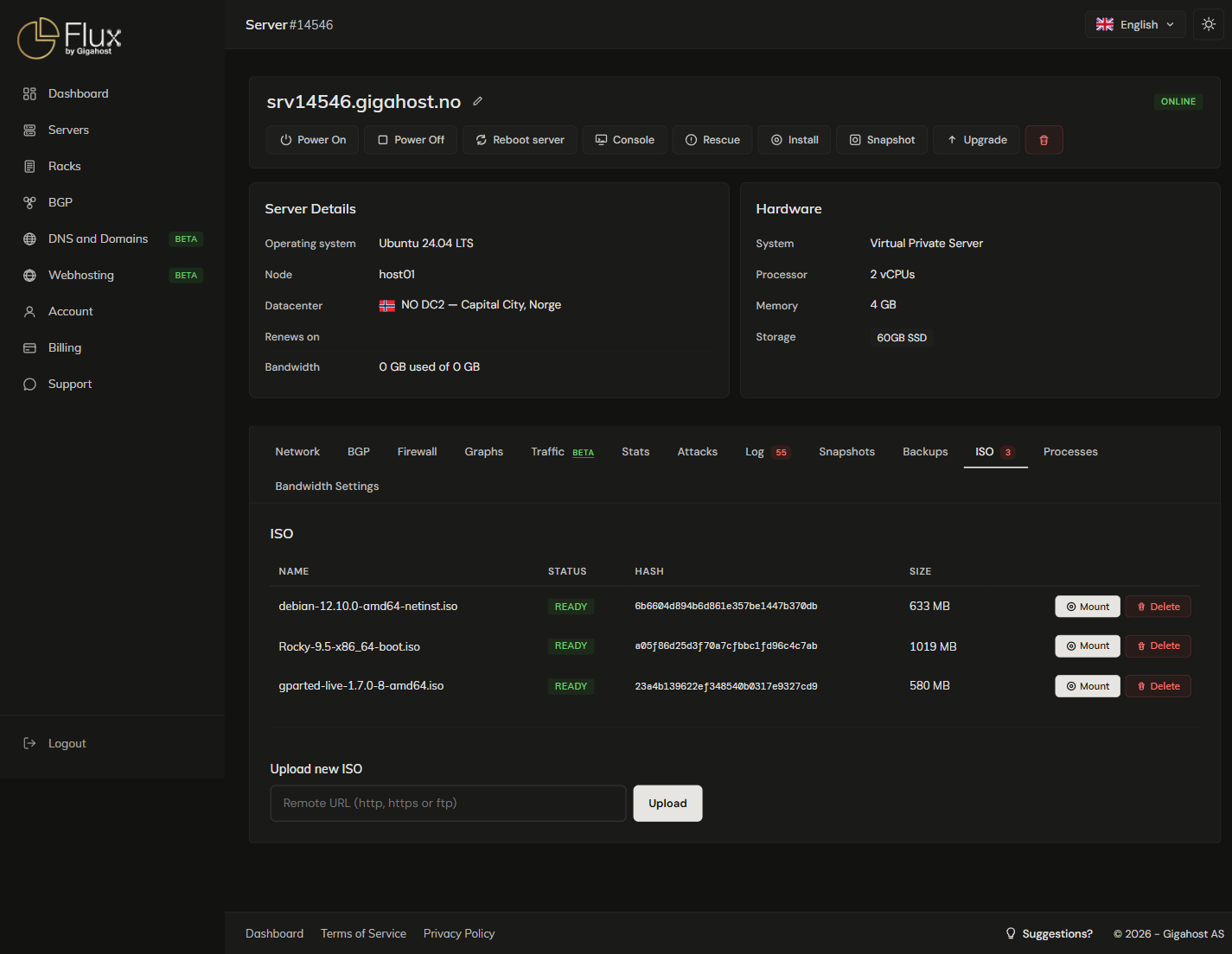
Uploading an ISO
Gigahost downloads the ISO from a public URL; you cannot upload from your own machine. The URL must be http, https or ftp and end in .iso; anything else is refused with URL not an ISO.
The ISO library belongs to the account: every KVM server on the account can mount any ISO in it.
If a row ends in ERROR, the download failed. Delete the row and check the URL.
Mounting an ISO
WARNING
Mounting reboots the server at once. Save your work first.
Mount attaches the ISO as a CD/DVD drive first in the boot order and reboots the server. Use the Console to drive the installer. One ISO can be mounted at a time.
Dismounting an ISO
The ISO list has no dismount button. Use Dismount in the banner at the top of the server page, or Dismount current media in the console's Media panel. Dismounting puts the disk back first in the boot order and reboots the server.
Deleting an ISO
Delete removes the ISO for every server on the account. To use it again, upload it again.
Limits
You can keep up to 3 ISOs per account, shared across all your servers. A fourth upload is refused with Max number reached (3). Delete one before uploading another.