

GPU servers
A GPU server is a KVM virtual server with one or two NVIDIA RTX 6000 cards passed through to it, managed in Flux like any other VPS. The cards arrive without drivers: you install the operating system, the NVIDIA driver and the CUDA version your software needs.
Plans
| Plan | GPU | vCPU | RAM | Storage | Price (ex. VAT) |
|---|---|---|---|---|---|
| GPU-1 | 1x RTX 6000, 24 GB | 8 (AMD EPYC 7542) | 24 GB | 300 GB NVMe | kr 1 790/month or kr 2.85/hour |
| GPU-2 | 2x RTX 6000, 48 GB in total | 8 (AMD EPYC 7542) | 24 GB | 300 GB NVMe | kr 2 990/month or kr 4.75/hour |
Both plans have a 10 Gbit port, 20 TB traffic per month, one IPv4 address and a routed /48 IPv6 prefix, and run in NO DC4 in Sandefjord. Larger configurations are priced on request through Support. Current prices are on gigahost.no/gpu-server.
Order from the Deploy page: pick GPU Instances as the platform.
The GPU on your server
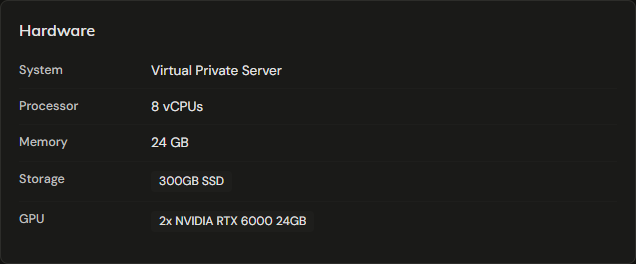
Each card is passed through whole with PCIe passthrough, so it is not shared with other customers and all 24 GB of VRAM are yours. Inside the server a card shows up as four PCI functions: the GPU itself plus its audio, USB and USB-C controllers.
The card is a Quadro RTX 6000 from the Turing generation (TU102, compute capability 7.5). Two things follow from that:
- The Tensor Cores do FP16 and INT8, not BF16 or FP8. Software that defaults to
bfloat16has to be told to usefloat16, and FP8 model files will not run. - FlashAttention 2 needs a newer GPU. llama.cpp and Ollama have their own attention kernels and run fine, see Run Qwen3.8-27B.
Get started
- Install the operating system. Ubuntu 24.04, Debian 13, AlmaLinux 10 and Windows Server 2025 are tested with the guides below.
- Install the NVIDIA driver: Linux or Windows.
- Run something on it, for example Qwen3.8-27B.
TIP
Choose an SSH key when you install a Linux OS. AlmaLinux 10 refuses root password logins over SSH, so the root password only works in the Console.
ECC memory
ECC on the VRAM is off when you receive the server. Turning it on protects against memory bit flips and costs 1.5 GB of VRAM per card (24 576 MiB drops to 23 040 MiB). With the driver installed:
nvidia-smi -e 1    # 0 turns it off again
reboot
nvidia-smi --query-gpu=index,ecc.mode.current,memory.total --format=csv
The setting is stored on the card, so it survives a reinstall of the OS.