

Run Qwen3.8-27B
This page runs Qwen3.8-27B on a GPU server with Ollama or llama.cpp. The NVIDIA driver must be installed first, see Linux or Windows.
Qwen3.8-27B is a 27-billion-parameter open model (Apache 2.0) with optional step-by-step thinking, tool calling and image input. In full precision it needs about 54 GB, so it runs quantized: the weights are compressed to 4 to 8 bits per parameter in a GGUF file. Both tools below use GGUF files and run on the Turing cards.
Which quantization fits
Tested on a GPU-2 server, with the model on one card to stand in for GPU-1. Speeds are generated tokens per second for a single chat, measured with llama.cpp.
| Plan | Model file | Size | Context | VRAM used | Speed |
|---|---|---|---|---|---|
| GPU-1 | UD-Q4_K_XL | 17.6 GB | 32 768 | 19.9 GB | about 29 tokens/s |
| GPU-2 | UD-Q4_K_XL | 17.6 GB | 262 144 (full) | 18.2 + 18.4 GB | about 29 tokens/s |
| GPU-2 | Q8_0 | 29.0 GB | 65 536 | 16.8 + 16.2 GB | about 19 tokens/s |
On one card, 4-bit leaves room for a 32 768-token context; larger files leave less. On GPU-2 you choose between the full 262 144-token context at 4-bit and near-lossless 8-bit weights at a lower speed. Speed does not grow with the second card: llama.cpp puts half the layers on each card and runs them one after the other.
Ollama
Ollama is the shortest way to a running model. It installs as a service, downloads the model on first use and spreads it over all cards it finds.
curl -fsSL https://ollama.com/install.sh | sh
ollama run qwen3.8:27b
qwen3.8:27b is a 17 GB 4-bit build. The installer ends with >>> NVIDIA GPU installed. when it has found the driver. The first answer after the model is loaded can take a minute or more while the GPU warms up; after that it answered at 36 to 49 tokens/s in our tests.
Thinking is on by default. Turn it off for a single run with --think=false, and add --verbose to print the speed after each answer:
$ ollama run qwen3.8:27b --verbose --think=false "Explain what a GPU is in three sentences."
...
prompt eval rate:     106.00 tokens/s
eval count:           89 token(s)
eval rate:            36.64 tokens/s
ollama ps shows how the model is placed (100% GPU means nothing runs on the CPU) and the context size Ollama chose, which depends on the free VRAM and the Ollama version (32 768 and 262 144 tokens in our tests). The Ollama API listens on 127.0.0.1:11434.
llama.cpp
llama.cpp is the engine underneath Ollama. Using it directly gives you any GGUF file, full control over context and placement, a web chat and an OpenAI-compatible API.
Build it
It builds from source against the CUDA toolkit, so install the driver with cuda-toolkit first. Build dependencies on Ubuntu and Debian:
apt install -y git cmake libcurl4-openssl-dev libssl-devOn AlmaLinux:
dnf install -y git cmake gcc-c++ libcurl-devel openssl-develThen build. CMAKE_CUDA_ARCHITECTURES=75 compiles for the RTX 6000 only, which saves time. The build takes about 7 minutes on the 8 vCPUs.
export PATH=/usr/local/cuda/bin:$PATH
git clone https://github.com/ggml-org/llama.cpp
cd llama.cpp
cmake -B build -DGGML_CUDA=ON -DCMAKE_CUDA_ARCHITECTURES=75
cmake --build build --config Release -j 8 --target llama-server llama-cli
Start the server
-hf downloads the file from Hugging Face on the first start and caches it under ~/.cache/huggingface/hub.
GPU-1:
build/bin/llama-server -hf unsloth/Qwen3.8-27B-GGUF:UD-Q4_K_XL -c 32768 --port 8080GPU-2, 8-bit:
build/bin/llama-server -hf unsloth/Qwen3.8-27B-GGUF:Q8_0 -c 65536 --port 8080GPU-2, 4-bit with the full context:
build/bin/llama-server -hf unsloth/Qwen3.8-27B-GGUF:UD-Q4_K_XL -c 262144 --port 8080The model is ready when the log says llama_server: listening on http://127.0.0.1:8080. On GPU-2 it is spread over both cards automatically. To pin it to one card, start it with CUDA_VISIBLE_DEVICES=0 in front, and run a second model on card 1 with CUDA_VISIBLE_DEVICES=1 and another port.
The download also fetches mmproj-BF16.gguf, which lets the model read images you attach in the chat.
Chat in the browser
llama-server listens on 127.0.0.1 only, so it cannot be reached from the internet. Open an SSH tunnel from your own computer and browse to http://localhost:8080:
ssh -L 8080:127.0.0.1:8080 root@your-server-ip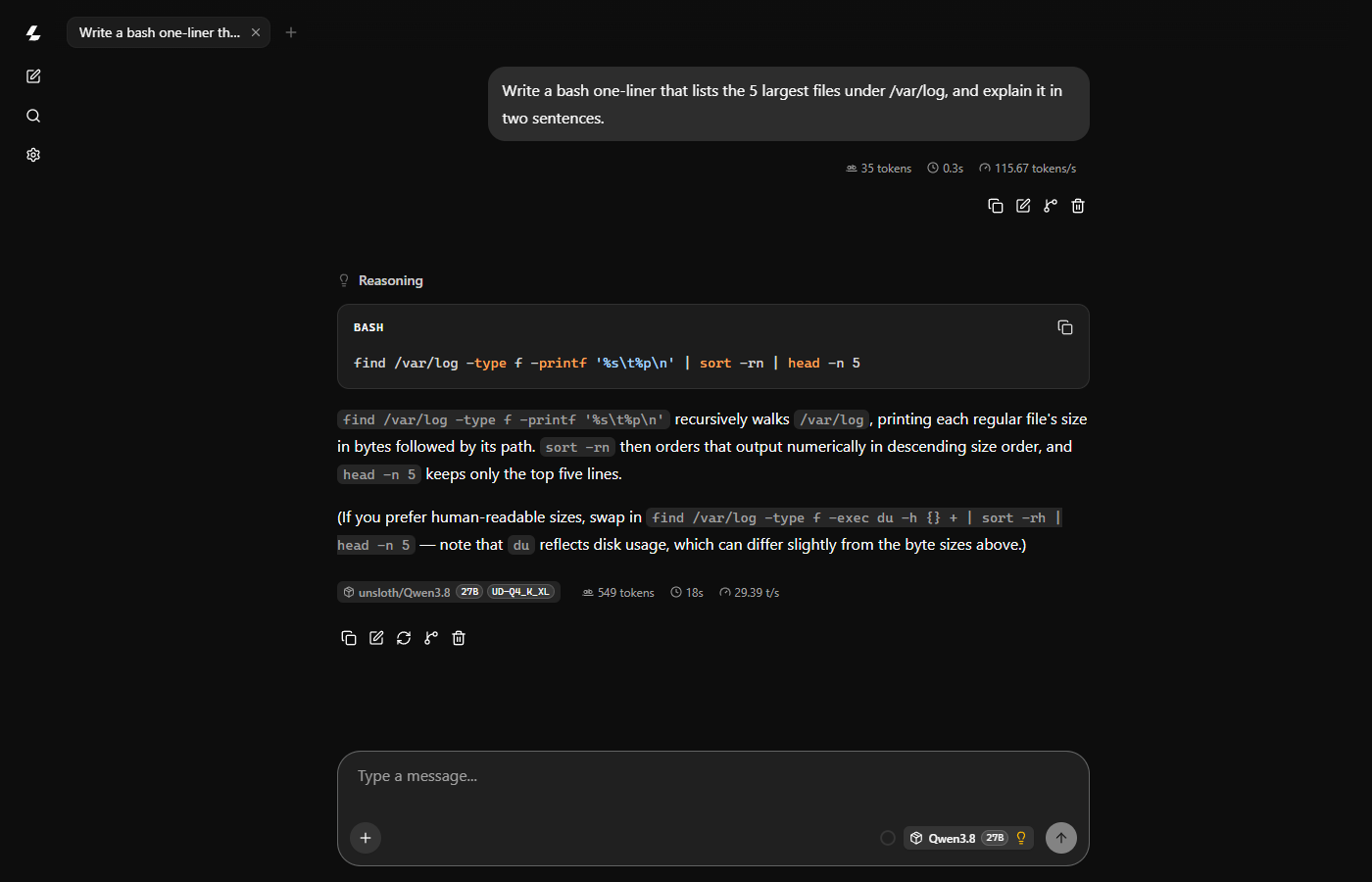
WARNING
Do not start llama-server with --host 0.0.0.0 unless you also set --api-key. Without it anyone who finds the port can use the model: the log warns no API key is set and CORS allows all origins. If you open it, limit the port to your own IP in the Firewall.
Use the API
The server speaks the OpenAI chat API on /v1/chat/completions, so OpenAI client libraries work with the base URL http://127.0.0.1:8080/v1.
curl -s http://127.0.0.1:8080/v1/chat/completions \
  -H "Content-Type: application/json" \
  -d '{
    "messages": [{"role": "user", "content": "Write a Python function that checks if a string is a palindrome. Keep it short."}],
    "chat_template_kwargs": {"enable_thinking": false},
    "temperature": 0.7, "top_p": 0.8, "top_k": 20
  }'
The answer:
```python
def is_palindrome(s: str) -> bool:
    return s == s[::-1]
```
The response also carries a timings object with the prompt and generation speed.
Thinking or not
Qwen3.8 thinks before it answers unless told otherwise. The thinking is returned separately (reasoning_content in the API) and shown under Reasoning in the web chat. It gives better answers to hard questions and costs time on easy ones.
- Turn it off per request with
"chat_template_kwargs": {"enable_thinking": false}. - Make it shorter with
"chat_template_kwargs": {"reasoning_effort": "low"}. The model's template acceptsxhigh(the default),mediumandlow; any other value is rejected withUnexpected reasoning effort.
Qwen recommends temperature 1.0, top_p 0.95 and top_k 20 with thinking on, and temperature 0.7, top_p 0.8, top_k 20 and presence_penalty 1.5 with it off.
Windows
Both tools run on Windows Server 2025 once the NVIDIA driver is installed. Work in PowerShell over Remote Desktop.
Ollama
Download and run OllamaSetup.exe. Ollama then runs in the background, and the same commands as on Linux work in PowerShell:
ollama run qwen3.8:27b --verbose --think=false "Explain what a GPU is in three sentences."It answered at 28.7 tokens/s on a GPU-2 server.
llama.cpp
On Windows you download a ready-made build instead of compiling:
- Install the Visual C++ runtime. Without it llama.cpp exits at once with no message (exit code
-1073741515). - From the llama.cpp releases, download
llama-<build>-bin-win-cuda-12.4-x64.zipandcudart-llama-bin-win-cuda-12.4-x64.zipand unpack both into the same folder, for exampleC:\llama.
Pick the CUDA version in the file name by the CUDA Version that nvidia-smi shows. With driver 597.16 (CUDA 13.2) the cuda-13.4 build finds the cards and then stops when the model loads with CUDA error: the provided PTX was compiled with an unsupported toolchain. The cuda-12.4 build works.
On a fresh Windows Server, -hf can fail with SSL server verification failed: Windows has not yet fetched the root certificate for Hugging Face. Open the site once from PowerShell and try again:
Invoke-WebRequest https://huggingface.co -UseBasicParsing | Out-NullStart the server the same way as on Linux:
cd C:\llama
.\llama-server.exe -hf unsloth/Qwen3.8-27B-GGUF:UD-Q4_K_XL -c 32768 --port 8080
The model is cached under C:\Users\<user>\.cache\huggingface\hub. Open http://127.0.0.1:8080 in a browser on the server for the web chat. It generated 26 to 27 tokens/s with the model on one card and on both. The first answer after the start was slower (under 10 tokens/s) while the GPU warmed up.