

Register a domain
Click Register Domain on the DNS and domains page.
Register before you add a zone
Registration is refused with Domain already exists in the system. if a DNS zone with the same name already exists. If you created the zone first, export its records, delete the zone, register the domain and import the records again.
1. Check availability
A name without a TLD is checked as .no.
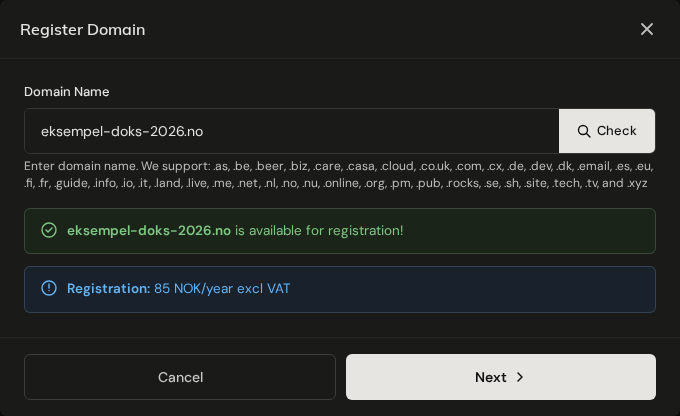
The price is per year, excluding VAT.
PREMIUMnext to the price means the registry prices this name individually. The price shown is what you pay.Minimum N yearsmeans the TLD can only be registered for that many years at a time, and the total for the whole period is invoiced at once.
For a few TLDs the yearly renewal costs more than the first year.
2. Registrant
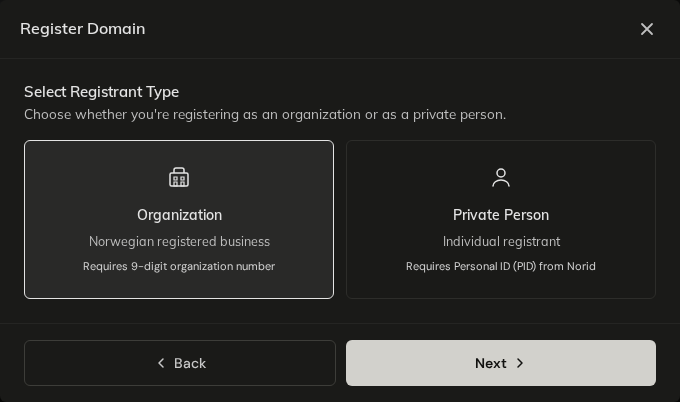
The registrant is the legal owner of the domain.
.no domains
- An Organization needs its 9-digit organisation number.
- A Private Person needs a personal ID (PID) from Norid in the format
N.PRI.xxxxxxxx. Get one at pid.norid.no before you start.
Other TLDs
Some registries need more than a name and address:
| TLD | Requirement |
|---|---|
.se, .nu | An identification number: organisation number for companies, personal identity or passport number for individuals. |
.dk | A CVR or company registration number when the registrant is a company. |
.es | An identification number of 5 to 20 characters: passport, national ID or company number. |
.it | An identification number, also for individuals: VAT or organisation number for companies, personal identification number for individuals. |
.be | A VAT number when the registrant is an organisation in the EU/EEA. |
.fi | A Finnish business ID (Y-tunnus, e.g. 1234567-8) for companies, a personal identity code for Finnish individuals, or date of birth (YYYY-MM-DD) for individuals outside Finland. |
.fr, .re, .pm, .yt, .tf, .wf | Registrant and administrative contact must be resident in the EU/EEA or Switzerland. |
.nl | Names with special characters (IDN) cannot be registered. |
A missing or malformed number is refused when the order is placed, with a message that names the TLD.
.nl needs approval by email
After a .nl registration, the registrant receives an email asking them to approve it. If it is not approved within 7 days, the registration is cancelled. Make sure the registrant email is one that is read.
3. Nameservers
Gigahost Nameservers creates a zone with Gigahost's default records, which you edit in Flux afterwards. Custom Nameservers takes two or three nameservers of your own.
For a .no domain, custom nameservers must already answer for the domain when you submit. If one of them does not, registration fails with Unable to verify nameservers being authoritative for the zone <domain>. Reverting changes. Set up the zone at your DNS provider first.
4. Review and submit
Submitting registers the domain and invoices the first period right away. Auto-renew is on for a new domain.
.nodomains are registered at once and showACTIVE.- Other TLDs show
PENDINGuntil the registry confirms, and you get an email when it does.
See Manage a domain for renewal, nameservers and later changes.
When registration is refused
| Message | What to do |
|---|---|
This TLD is not available for registration. | Gigahost does not sell this TLD. |
Domain already exists in the system. | A zone with this name exists. See the tip at the top of this page. |
Your account is currently under review and domain orders are temporarily disabled. | Wait until the review is finished, or contact Support. |
You have unpaid domain invoices. Please settle them before registering more domains. | Pay the open domain invoices under Billing. |
Your account does not permit ordering new services. | Contact Support. |
Domain registration failed: <reason>. DNS zone has been removed. | The registry refused the order. Nothing is kept and the invoice is credited. Correct what the reason says and try again. |