

Transfer a domain
A transfer moves the registration of a domain to Gigahost. This page covers one domain at a time; for many .no domains, or everything on a Domeneshop account, use Mass transfer.
Before you start
- Get the code the current registry needs (see Codes per TLD).
- Decide whether the domain should keep its current nameservers. If it should move to Gigahost's nameservers, add the zone in Flux and import or enter its records first, so websites and email keep working when the nameservers change.
Start the transfer
- From an existing zone: click the warning triangle next to the zone name in the zone list.
- Together with a new zone: click Add DNS Zone / Transfer domain, enter the domain and tick Transfer domain to Gigahost. Tick Do not change nameservers to Gigahosts, keep existing ones if the domain should keep its current nameservers.
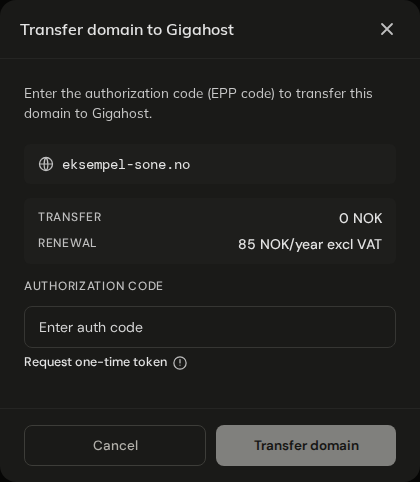
For TLDs other than .no you also enter the registrant and contact details, with the same per-TLD requirements as registration.
Nameservers change on some transfers
A .no transfer started from the warning triangle keeps the domain's nameservers. A transfer started from Add DNS Zone / Transfer domain switches the domain to Gigahost's nameservers unless you tick the box to keep them, and so does a transfer of any other TLD from the warning triangle. Make sure the zone in Flux holds every record the domain needs before you submit. For .no, switching nameservers also removes any DNSSEC records at Norid; turn DNSSEC on again afterwards.
Codes per TLD
| TLD | What to enter |
|---|---|
.no | The auth code from the current registrar, or a one-time code from Norid. Both go in the same field. |
.be | The transfer code from dns.be. DNS Belgium sends it to the registrant's email address. |
.fr, .re, .pm, .yt, .tf, .wf | The auth code. It must be at least 12 characters with an upper case letter, a lower case letter and a digit. |
.co.uk and other .uk | No code. Ask your current registrar to change the domain's IPS tag to ASCIO. The transfer completes once the tag has changed. |
| Other TLDs | The auth code (EPP code) from the current registrar. |
Norid one-time code
For .no without an auth code, click Request one-time token. Norid emails a one-time code to the email address registered on the domain, which is the holder's address and not necessarily yours. Enter that code in the auth code field.
You can request up to 10 one-time codes per day, and up to 3 for the same domain.
What it costs
.no: the transfer is free. The annual fee is invoiced two months before the domain expires. If the domain was inside its renewal period, Norid renews it for a year as part of the transfer; that year is invoiced right away on a separate invoice.- Other TLDs: transfers started within 15 days of each other are collected on one invoice.
After you submit
- A
.notransfer with a valid code completes at once, with auto-renew on. - If Norid holds the transfer for approval, Gigahost completes it by hand. You do not need to submit it again.
- Other TLDs show
TRANSFER PENDINGuntil the registry finishes. If the status changes toACTION REQUIREDorDOCUMENTATION REQUIRED, follow the instructions in the email from the registry, or contact Support.
When a transfer is refused
| Message | What to do |
|---|---|
Failed to transfer domain <domain>. Please check AUTH-code and try again. | The code is wrong or expired. Get a new one and try again. |
A transfer for this domain is already in progress. | A transfer is already running, for example from a mass transfer. Wait for it to finish. |
Too many one-time token requests. Please try again tomorrow. | The daily limit for one-time codes is reached. |
A one-time token can only be requested for .no domains. | Use the auth code from the current registrar. |
Your account is currently under review and domain transfers are temporarily disabled. | Wait until the review is finished. |
An auth code is required to transfer this domain. | Enter the code from the current registrar. |
Auth code must be provided. | Enter the code from the current registrar. |