

Mass transfer of .no domains
Mass transfer on the DNS and domains page moves many .no domains to Gigahost in one go, from a pasted list or straight from a Domeneshop account. Other TLDs are transferred one at a time.
Transferring a .no domain is free. The annual fee is invoiced when the domain is due for renewal. If a domain is inside its renewal period when it moves, Norid renews it for a year as part of the transfer and that year is invoiced separately right away.
Manual list
Paste one domain per line, with the auth code or Norid one-time code after it, separated by a space, comma or semicolon.
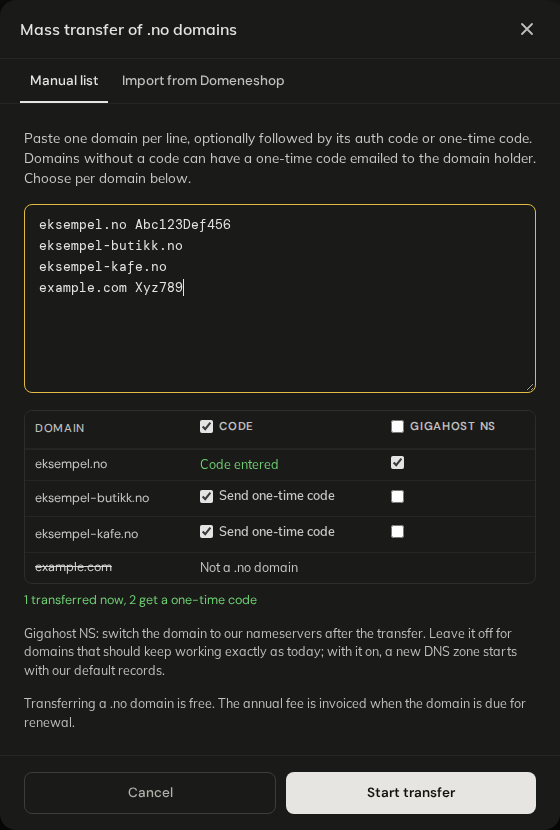
- For a domain without a code, tick Send one-time code to have Norid email a one-time code to the domain holder. Leave it unticked and the line is skipped.
- Gigahost NS switches the domain to Gigahost's nameservers after the transfer. Leave it off for domains that should keep working exactly as today.
One transfer holds at most 200 domains. Domains with a code are queued at once; domains waiting for a one-time code are listed under Pending transfers.
Gigahost NS and records
With Gigahost NS on, the domain moves to Gigahost's nameservers as soon as the transfer completes. If there is no zone with the domain's records in Flux, the new zone starts with Gigahost's default records only, and the domain's website and email stop working. Add the zone and its records first (a zone file import is the quickest way). An existing zone in Flux is kept as it is.
Import from Domeneshop
Import from Domeneshop reads your Domeneshop account and moves the domains you pick, with their DNS records and web redirects.
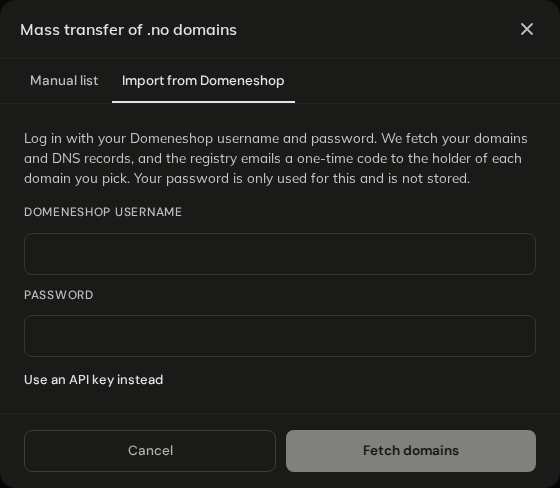
1. Log in
Flux uses your Domeneshop login once to read the account and does not store it. If the Domeneshop account has two-factor login, click Use an API key instead and enter an API token and API secret created in your Domeneshop account.
2. Choose domains
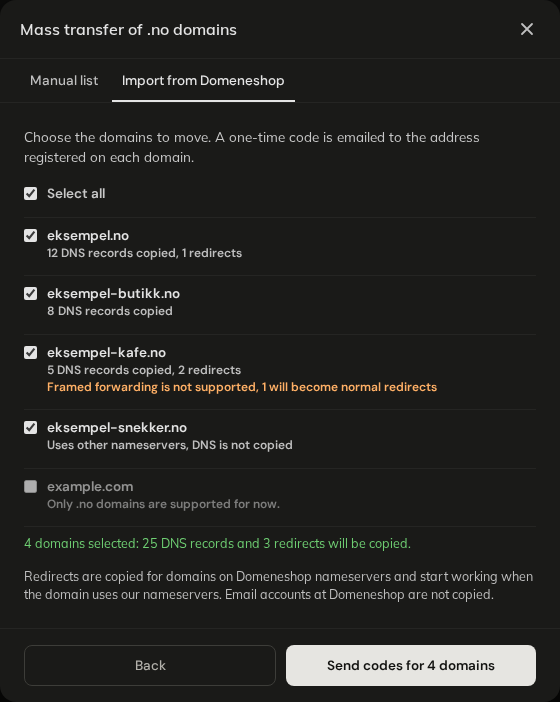
- Domains on Domeneshop's nameservers are switched to Gigahost's nameservers when the transfer completes, with their records, so they keep working.
- Domains on other nameservers keep their nameservers, and their DNS is not copied.
What is copied:
- DNS records of type
A,AAAA,CNAME,MX,SRV,TXTandCAA. Other types are skipped. A TTL under 60 seconds is set to 3600. - Web redirects. Framed forwarding is not supported; those become normal redirects. Redirects start working when the domain uses Gigahost's nameservers.
- Email accounts at Domeneshop are not copied. The
MXrecords are, so mail keeps going to Domeneshop until you change them.
Click Send codes for N domains within an hour of fetching; after that, log in again. Norid emails a one-time code for each domain to the address registered on it.
Pending transfers
Pending transfers (N) lists every domain that is waiting for a code or is queued.
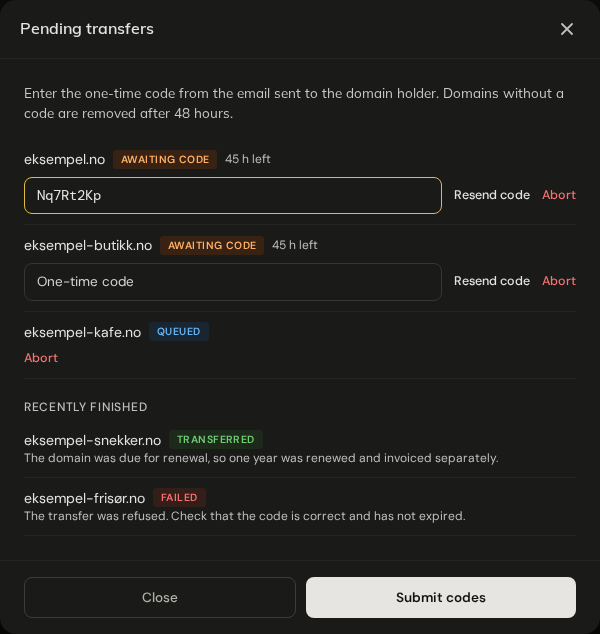
- Enter the one-time code from the email next to each domain. You can submit some codes now and the rest later.
- A domain without a code is removed after 48 hours. Resend code sends a new email but does not extend the 48 hours.
- Norid sends at most 3 codes per domain per day.
- Abort stops a domain that is waiting for a code or is queued. A zone the transfer created is deleted again, with any redirects it imported.
When every domain in a transfer is finished, you get an email with the result for each one.
Transfer status
| Status | Meaning |
|---|---|
AWAITING CODE | Waiting for the one-time code from the email. |
QUEUED | Has a code and waits for its turn. Transfers run in the background, a few domains at a time. |
TRANSFERRED | Done. Auto-renew is on. |
AWAITING REGISTRY | Norid accepted the transfer but holds it for approval. Gigahost completes it by hand. |
FAILED | See the message on the line. |
EXPIRED | No code was entered within 48 hours. Start again with a new code. |
Common messages on a failed domain:
The transfer was refused. Check that the code is correct and has not expired.Get a new code and transfer the domain again.Transferred, but the nameservers could not be changed to ours. The domain still uses its old nameservers.The transfer is done. Change the nameservers under Manage a domain.The registry could not be reached. Please try again later.Start the domain again later.The domain is in use by another account.The zone exists on another Gigahost account. Contact Support.
When a mass transfer is refused
| Message | What to do |
|---|---|
Your account is currently under review and domain transfers are temporarily disabled. | Wait until the review is finished. |
Incomplete account profile. Please complete your profile to enable DNS services. | Fill in address, postcode, city and country under Account. |
Domeneshop asks for a two-factor code, which we cannot handle yet. Use an API key instead. | Log in with an API token and secret. |
Could not log in to Domeneshop. Check the username and password. | Check the login at domene.shop. |
The import has expired. Please connect to Domeneshop again. | More than an hour passed since Fetch domains. Log in again. |