

DNSSEC
DNSSEC signs a domain's DNS answers so resolvers can detect forged records. It is available for domains registered with Gigahost and is switched with the DNSSEC badge in Domain Details on the zone page.
Domains on Gigahost nameservers
Click the badge and confirm. Gigahost signs the zone, manages the keys and sends the DS records to the registry. Click the badge again to turn it off.
Domains on external nameservers
When another DNS provider serves the zone, that provider signs it, and Gigahost passes the DS records on to the registry.
- Turn on DNSSEC at your DNS provider and copy the DS record (key tag, algorithm, digest type and digest).
- Click the badge, enter the record and click Add DS record. Repeat for each DS record the provider gives you.
- Click Submit. The records you submit replace every DS record the registry held for the domain.
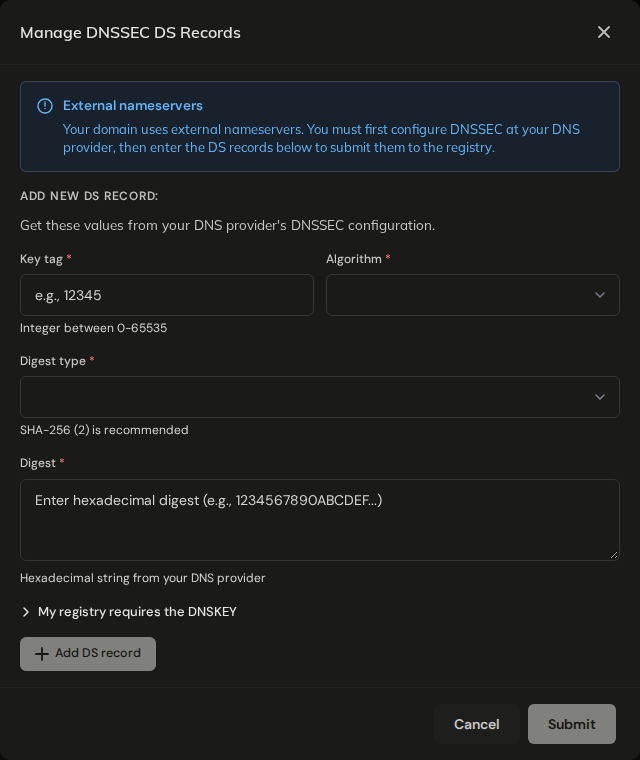
Use digest type SHA-256 (2). For TLDs other than .no, the registry only accepts SHA-1 (1) and SHA-256 (2).
To change the DS records later, turn DNSSEC off and submit the new set.
Registries that need the DNSKEY
For .be, .ch, .cz, .de, .ee, .eu, .li and .nl the registry wants the public key itself, not only the digest, for every record. Copy the key from the last field of the DNSKEY record at your DNS provider and choose 257 (Key Signing Key) unless the provider says otherwise.
For other TLDs, leave the DNSKEY fields empty.
DNSSEC and nameserver changes
Changing the nameservers of a .no domain removes its DS records at Norid and turns DNSSEC off, whichever direction you change them. Turn DNSSEC on again after the change; for external nameservers, wait until the new provider has signed the zone first. See Change nameservers.